PMS · Design System
Building a governance process that makes AI(Claude) stick to the design system
Overview
While redesigning PMS (Patient Management System) with AI(Claude), I documented the rules it had to follow and built a check into the process before generation, so it stuck to PMS's design system every time. Same tokens, same components, regardless of how familiar the requester was with the design system. Consistency and speed, together.
Problem
When designing with AI(Claude), how do you follow the user's prompt faithfully without losing the product's existing design language?
Even after training it on our design system, AI(Claude)'s output kept losing stability: a token missing here, a component invented there, even identical prompts producing different designs from one session to the next. This mattered most for PMS, healthcare admin software with per-send billing and a mix of users, including front-desk staff, doctors, and enterprise clients, where design instability wasn't something we could afford.
A recurring problem
Same system, but the design output differs by person and by session.
Why it's critical for PMS
Features like the follow-up report go straight to real patients and get billed per send, so plenty here needed careful handling.
Process · First attempt
Revising the prompt over and over didn't solve it.
Once I decided to redesign PMS's follow-up report page, I worked with Claude to write a PRD covering the pain points. (There were no existing planning docs, so I first asked the PM about the intent behind that page.) That led to one conclusion: the filter needed fixing. I attached the PRD and asked Claude Code to redesign just the filter. The filter itself came back clean: on-system, improved as intended. But the LNB, header, and icons, which were outside the request, got redrawn differently from the original. Fixing that meant revising the prompt over and over, and the workload kept piling up.
What I asked for
Improve the filter on the follow-up report page, with background in the PRD, requested from Claude Code.
What came back
The filter matched the brief and intent, but the LNB, header, and icons, which weren't part of the request, drifted off-system.
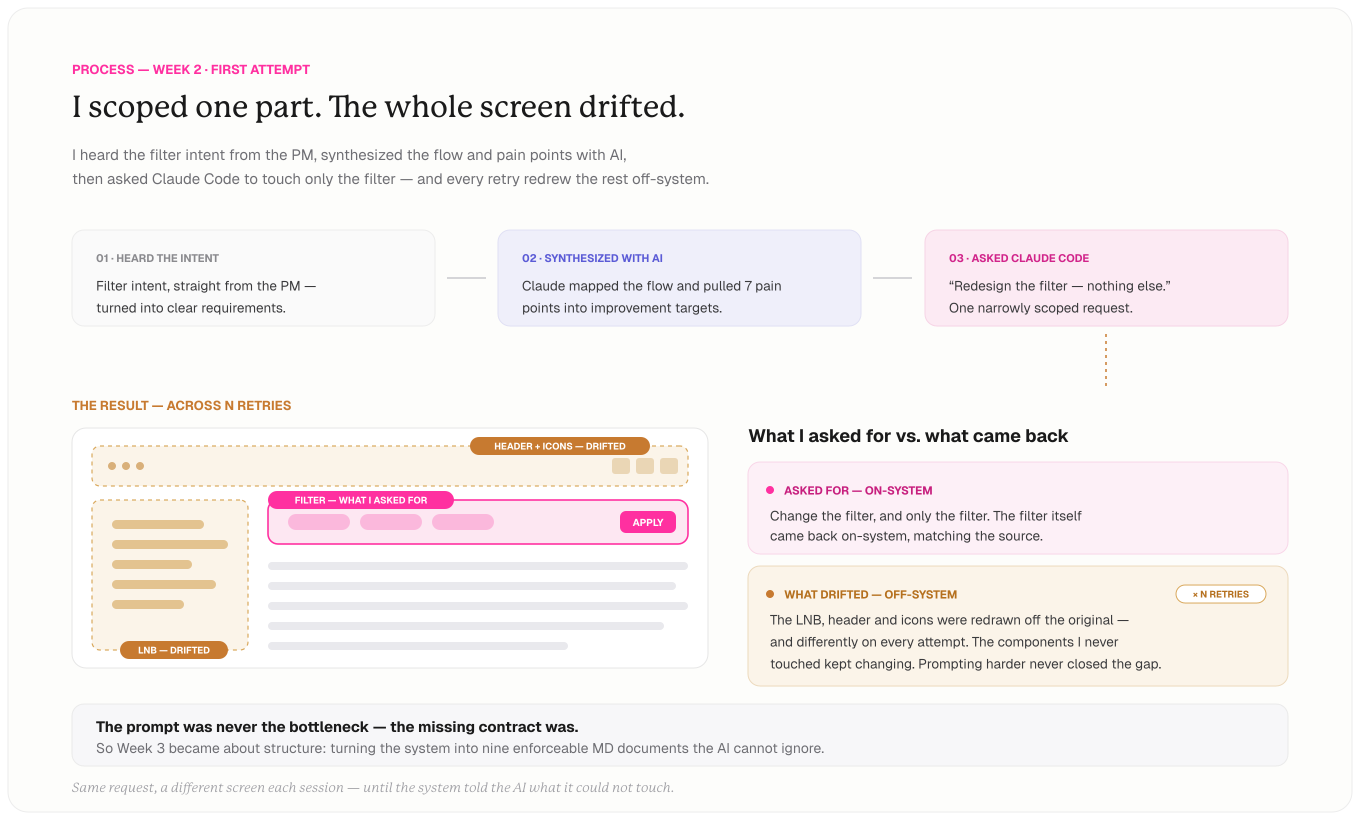
Seeing anything outside the prompt's explicit request drift off-system, session after session, I realized what was missing was a contract the AI(Claude) couldn't ignore.
Process · The system
So I built an execution harness that enforces the contract.
I split the system into 9 MD documents and made every request pass through them in order, from DOC1's role dictionary to DOC7's generation gate. Break a rule at any step, and it stops right there and retries, so AI(Claude) can never skip ahead on its own.
Abstraction layer · DOC1
Editors don't need to know tokens or components. They just write a role name, and AI(Claude) maps it to the exact token and component. That way the outcome stays the same, regardless of how familiar the requester is with the design system.
Generation gate · DOC7
AI(Claude) prints a PASS / FAIL pre-flight check before drawing, and stops if even one check fails.
Drift prevention
The original design is locked from edits. Anything new gets tried out in a separate space first, and only ships once a person reviews it.
Setting a restore point
I locked a single original design spec in place, so if anything went wrong, I could always roll back to it.
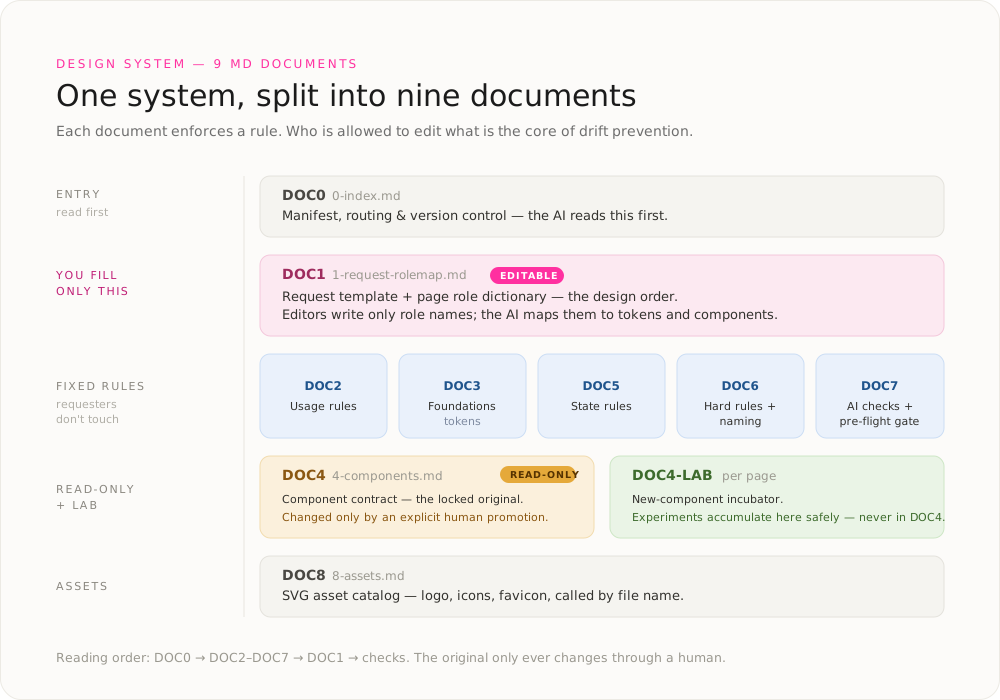
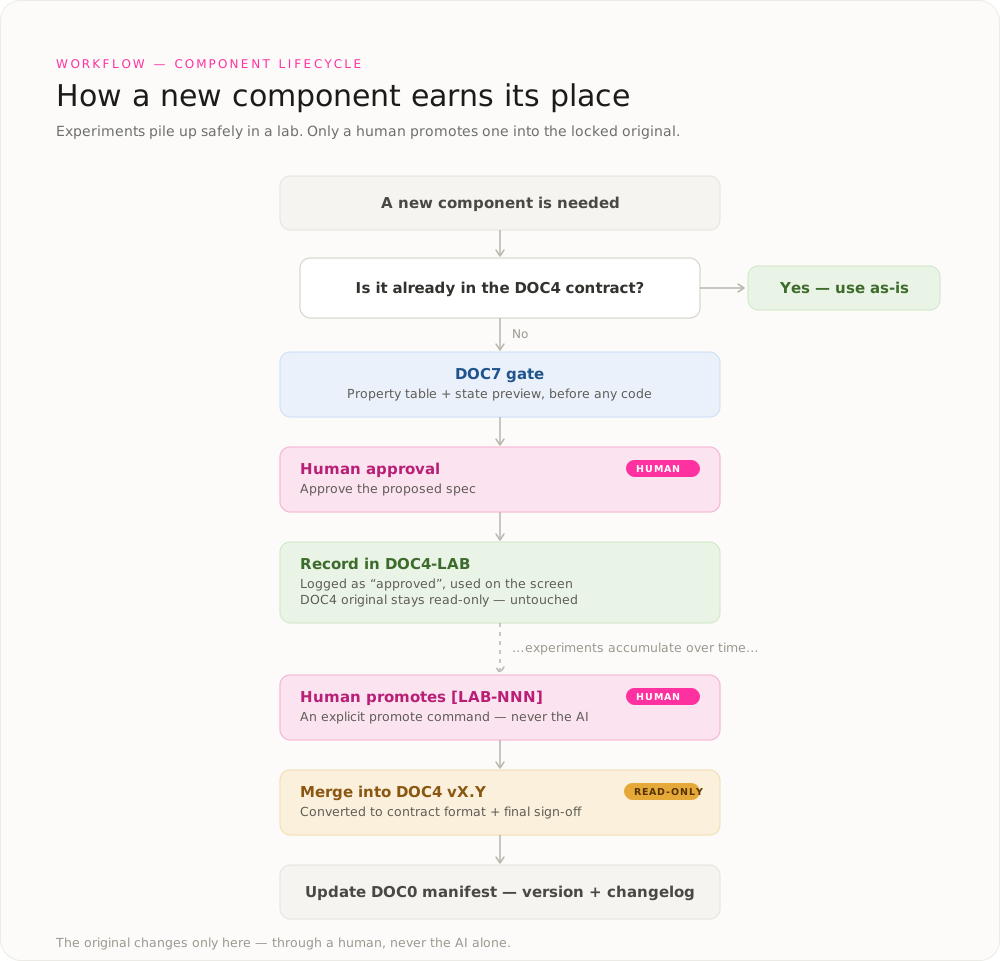
Adding a new component to the original component doc now requires human sign-off, so AI(Claude) can never quietly change the original design on its own. Without that approval step, unreviewed changes would pile up session after session until the design became unmanageable.
Applied Example
This time, only the filter changed.
I applied the harness I'd just built and re-ran the same follow-up report filter improvement from my first attempt. This time I wrote a plain-language prompt, and the harness routed it through the MD document flow, from DOC1's role dictionary through DOC7's generation gate, before any design was generated. The result: an improved filter with a summary line and chip-tab sync, drawn cleanly within the system.
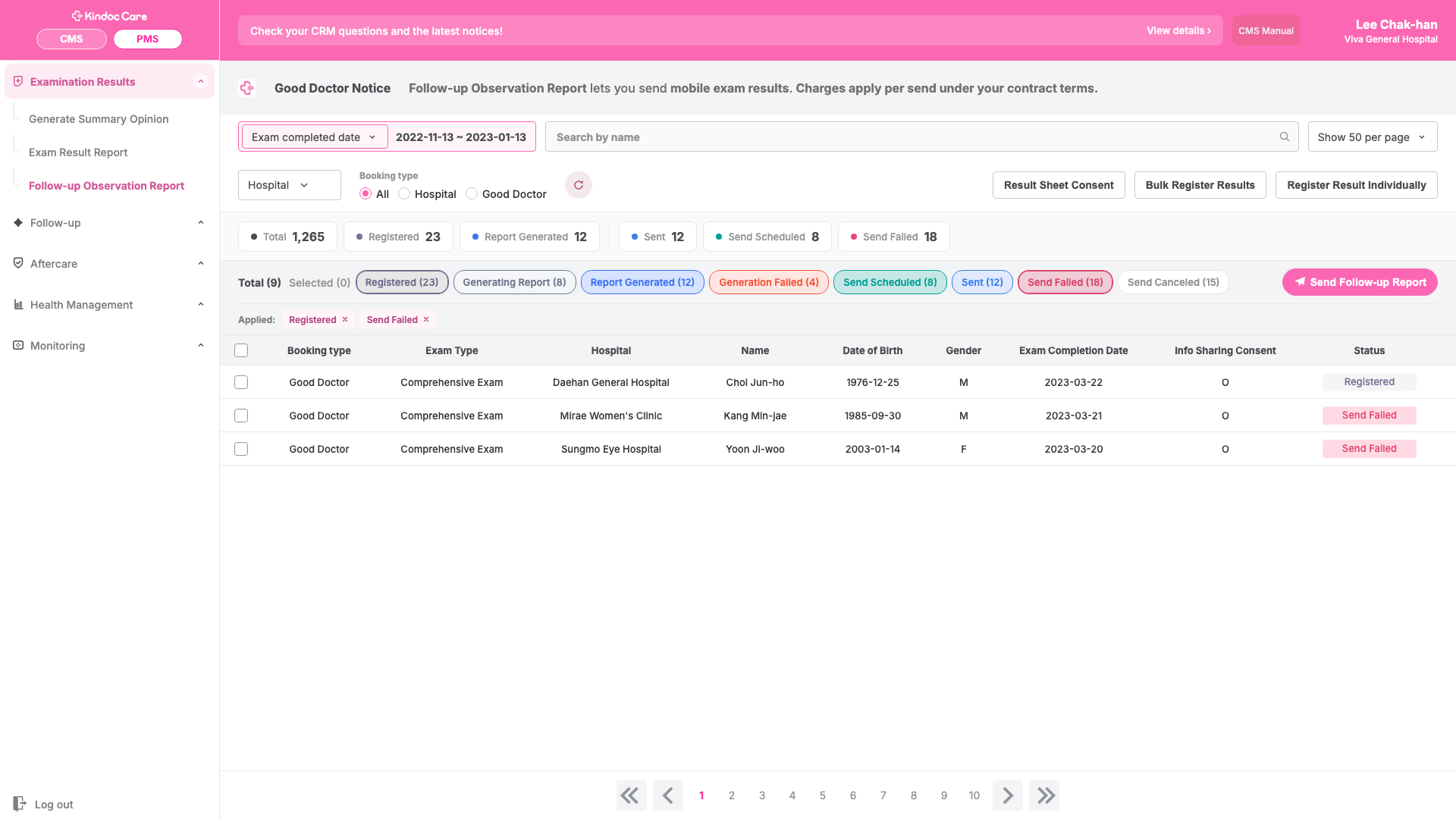
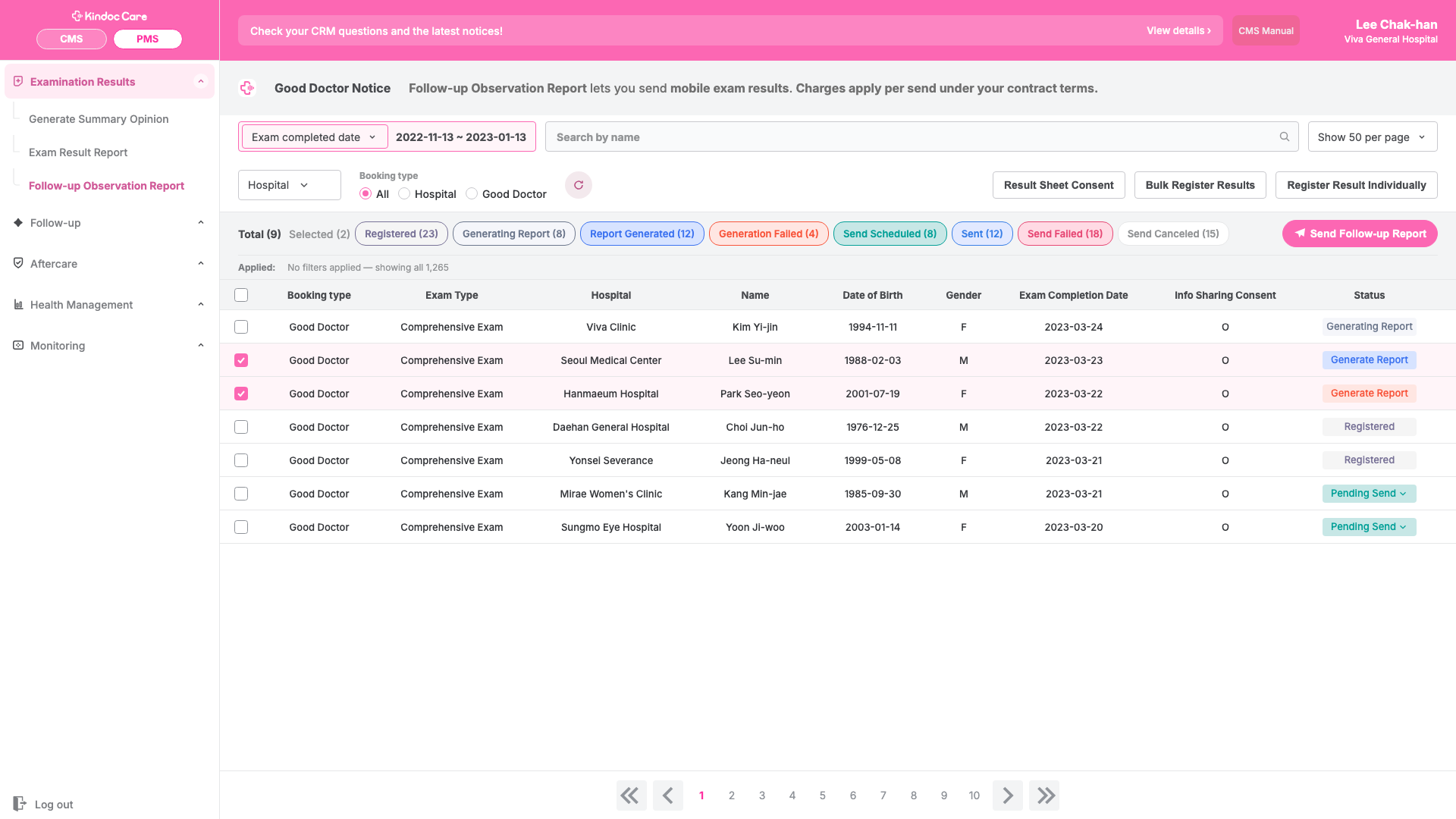
Filter summary line + chip-tab sync, shipped. Logged as [LAB-추적-003], in gate review.
Validation
The design stayed stable even when prompts varied.
People bring very different levels of design-system fluency, and requests could come from someone outside the design role entirely, so I needed to confirm the design stayed stable no matter how differently each prompt was phrased. I built a path that skipped DOC1 (the role dictionary) and sent the PRD straight through, then compared it against the path that went through DOC1. Both paths produced designs that held up against every rule, including tokens, the component contract, the LAB/promotion line, and the generation gate, confirming the result holds even without relying on DOC1 alone.
Path A · raw
Sent the PRD to Claude as-is.
Path B · via DOC1
The same PRD, reshaped into a role-name request following DOC1 (the role dictionary).
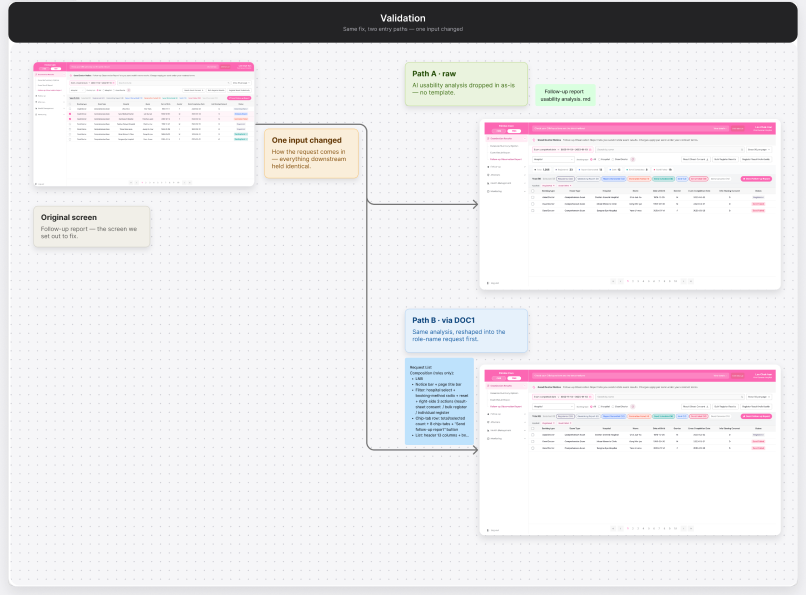
Because the other rules, like the generation gate and tokens, kept working even without going through DOC1.
Outcome
Consistency went up, work time went down, and collaboration got easier.
A solid system structure meant consistent designs, every time. Fewer unnecessary revision cycles meant shorter turnaround. And because the work is logged in documents, teammates can pick up the context and keep going without a hand-off meeting: less time spent explaining, more time spent working.